StokeBloke.com

emacs refresh F5 key

Thursday, April 17th, 2008

I use this little addition to my .emacs file to support reloading the current file I’m editing.

(defun refresh-file ()
  (interactive)
  (revert-buffer t t t)
  )

(global-set-key [f5] 'refresh-file)

You can also use CTRL-x CTRL-v to do a “Find alternative file” and choose the same file that you are currently editing. F5 is a little quicker though.

dont use stdio getc() or fgetc(), they are slow

Tuesday, April 15th, 2008

Well I thought I would write about an issue I have known about for some time, but it appears others still dont.

Its regarding stdio fgetc() performance. Mainly that using fgetc() is always slow and should rarely be used.

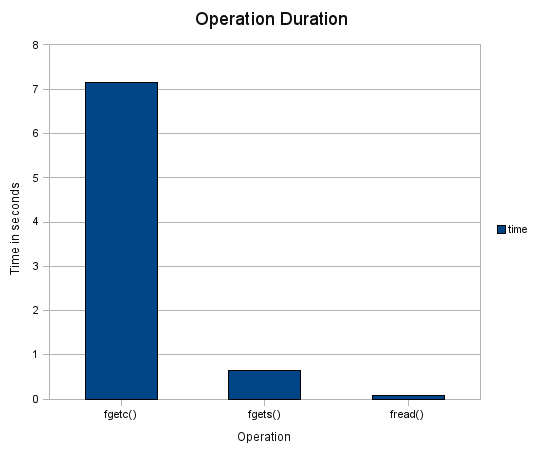
Here is a comparison of fgetc(), fread() and fgets() when reading a 333Mb mbox file created via thunderbird.

operation time
fgetc() 7.15 seconds
fgets() 0.65 second
fread() 0.08 seconds

Times are take on a quad core 2.4Ghz (linux 2.6.2.4 tuxonice r4 gentoo)

The performance issues clear show that retrieving information in larger ‘chunks’ is more efficient and its scary how different the performance is. Unless you only want 1 or a few characters, you should probably not use getc()

The code

fgetc()

clock_t start;
clock_t end;
FILE* testFile;
char buf[8*1024];
unsigned char chr;

testFile = fopen("testdata", "r");
start = clock();

while(!feof(testFile)) {
    chr = (unsigned char)getc(testFile);
}

end = clock();
printf("fgetc() %f seconds\n", ((float)end - (float)start) / (float)CLOCKS_PER_SEC);

fgets()

clock_t start;
clock_t end;
FILE* testFile;
char buf[8*1024];

testFile = fopen("testdata", "r");
start = clock();

do {}  while (fgets (buf, sizeof(buf), testFile) != NULL);

end = clock();
printf("fgets() %f seconds\n", ((float)end - (float)start) / (float)CLOCKS_PER_SEC);

fread()

clock_t start;
clock_t end;
FILE* testFile;
char data[8*1024];
int r = 1;

testFile = fopen("testdata", "r");
start = clock();

while(r!=0) {
    r = fread(data, sizeof(char), 1024*8, testFile);
}

end = clock();
printf("fread() %f seconds\n", ((float)end - (float)start) / (float)CLOCKS_PER_SEC);

Moving to WordPress 2.5

Thursday, April 10th, 2008

One of reasons I used to use simplyphpblog is that I could easily copy the blog from stokebloke to my home PC where I normally have a mirror running.

I use Unison to mirror my hosted site to my home PC. Its similar to rsync but provides a nice UI to check diffs and choose which way to propagate changes.

I have stayed away from using php with mysql because I didn’t know of an easy way to mirror the MySQL databases. Without the MySQL database working on both the hosted site and my home PC I would have trouble making changes without possibly breaking my hosted site. I never like making change on my hosted server, its always been better to check locally before uploading any changes.

I finally decided to use MySQL and configure it for wordpress. Setting up a new wordpress blog on my server was very easy. I exported the database from the hosted site and synchronised all the files to my home PC.

mysqldump --user=<user> --password=<password> --host=<hostname> <database> > <date>.sql

The only thing left then was getting the mysql database to work without changing any wordpress configurations, as I’d probably upload the changes to my hosted site and break that.

Lucky my hosted site used an alias for the MySQL server ‘remotemysqlhost’. I simply had to add this host to my PCs hosts file (making it resolve to localhost) and it would try to connect locally. I created the database with the same name, users,password etc. I then imported the SQL dump into the database.

bash> /usr/bin/mysqladmin -u root create %lt;database>
bash> /usr/bin/mysql -u root
mysql> connect <database>
mysql> GRANT ALL PRIVILEGES ON *.* TO '<username>'@'<host>' IDENTIFIED BY '<password>' with grant option;
mysql> exit;
bash> /usr/bin/mysql -u root <database> < <date>.sql

For some reason the wordpress pages kept jumping back to stokebloke.com. I figured out the wordpress needed to know about my localhost. To trick wordpress into using localhost for the links I just needed to patch the wp_options table locally. I.e

update wp_options set option_value = "http://localhost/wordpress"
where option_name = "home";
update wp_options set option_value = "http://localhost/wordpress"
where option_name = "siteurl";

Obviously if you want to access your wordpress blog from other PCs localhost should be replaced with the real PC name.

With that the database was working and I could then start to work on making a theme for wordpress so it appears like the rest of my site.

I still have an issue with the Tag Cloud widget using font sizes which are too large for my theme, but I decided to not use the tag cloud in the end.

UML tool in Netbeans is very slow

Thursday, April 10th, 2008

Well I finally decided to document some of the java classes in Model Manager.

I failed.

It appears Netbeans has a performance issue as the UML projects get larger the responsiveness of netbeans gets worse.

I had to submit this bug against Netbeans.

For some reason each click in Netbeans triggers a scanning of the XML document. As this document gets larger the scanning gets slower. Never mind the fact it only uses 1 of my 4 cores.

I looked into the actual UML project and the etd file is over 32 Mb. No wonder it takes a while to scan.

Edit: the issue has been fixed in Netbeans 6.1 beta version.

GNU java mail

Saturday, April 5th, 2008

Heres how I started to use GNU java mail to read mbox files.

Download archives

See http://www.gnu.org/software/classpathx/javamail/javamail.html#download

Extract the archives.

Build activation

cd activation-1.1.1
./configure &&  make && make javadoc

Build inetlib

cd inetlib-1.1.1
./configure &&  make && make javadoc

Build mail

First I copied the two dependant jars into the mail directory. This makes it easy to know what version was used for the build.

cp activation-1.1.1/activation.jar mail-1.1.2/
cp inetlib-1.1.1/netlib.jar mail-1.1.2/
cd mail-1.1.2/
./configure --with-activation-jar=./ --with-inetlib-jar=./ make && make javadoc

Using it

final Properties properties = new Properties();
properties.put("mail.mbox.mailhome", "/home/nwightma/java/mboxparser/");
properties.put("mail.mbox.inbox", "");

final Session session = Session.getInstance(properties);
// protocol=mbox;
// type=store;
// class=gnu.mail.providers.mbox.MboxStore;
// vendor=dog@gnu.org;
session.addProvider(new Provider(Provider.Type.STORE, "mbox",
"gnu.mail.providers.mbox.MboxStore", "dog@gnu.org", "1"));

final Store store = session.getStore("mbox");
if (store instanceof MboxStore) {
  store.connect();

  final Folder folder = store.getFolder("test.mbox");
  folder.open(Folder.READ_ONLY);
  System.out.println(folder.getFullName());
  //final int[] msgs =  { 0 };
  //System.out.println(folder.getMessages(msgs));
}

Opinion

Well firstly the mbox gnu mail stuff does work. Just don’t attempt to use it on any large mbox files.

In my case when I tried to open an mbox with 3597 emails it took over 6 minutes just to return the message count. It appears that the code loads all the messages into to memory so if you only want to process a couple you have to pay the hit to load them all.

Finding number of messages with grep take…

time grep -c "^From " test.mbox
3597

real	0m0.542s
user	0m0.403s
sys	0m0.138s

It appears that the folder.open(Folder.READ_ONLY) is the part which takes forever. Well to be exact the open call takes 359.952 seconds ~ 6 mins. After that thought the calls to get messages is very fast. I believe its loading the complete mbox into memory when you open the folder.

I believe that the mbox provider from gnu mail is fine if you want to process every part of the mbox, but if you want to use just some messages or some parts of these the overhead is simply not worth it.